Before the flowchart: three questions that decide everything
Most teams researching Google Tag Gateway do not need a tutorial first - they need to know which tutorial to follow. That comes down to three questions. Answer these honestly before you open any setup guide, including our own step-by-step implementation guide.
Do you control your edge?
Google Tag Gateway works by inserting routing rules into whatever sits between your visitors and your origin - a CDN, load balancer, or web server you can configure. On Shopify, Wix, Squarespace, or any hosted platform where the platform owns the CDN, you cannot implement GTG today. This single question rules out a meaningful share of small business sites immediately.
What is your edge, specifically?
Not what you would like to use - what is actually in front of your site right now. Cloudflare, Akamai, Fastly, CloudFront, a Google Cloud external Application Load Balancer, or plain Nginx all lead to different paths, because Google has built different levels of automation for different providers. If you are not sure, check your DNS records or ask whoever manages your hosting.
Is server-side GTM in your present or near future?
If sGTM is running, or realistically on your roadmap, your Google Tag Gateway decision changes regardless of what your edge is. The recommended combined architecture has a same-origin requirement that affects how both pieces are configured, so it is worth deciding this before you start the GTG setup rather than after.
The decision flowchart
Three questions, four destinations. Here is the full path from start to setup:
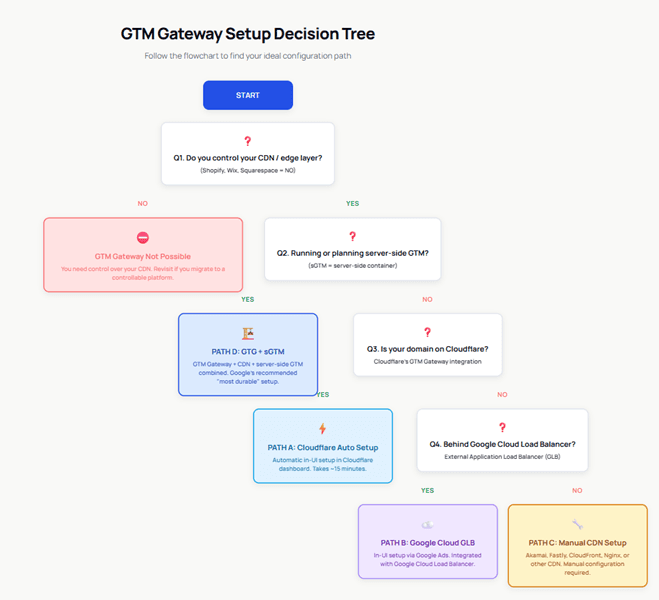
Reading it as text:
You do not control your CDN (Shopify, Wix, Squarespace)
Stop. Google Tag Gateway is not possible on your stack today.
You control your CDN, and server-side GTM is running or planned
Path D - the combined GTG plus CDN plus server-side GTM architecture, regardless of which CDN you use.
You control your CDN, no sGTM, and your domain is on Cloudflare
Path A - the Cloudflare automatic setup, roughly fifteen minutes.
You control your CDN, no sGTM, not on Cloudflare, behind a Google Cloud external Application Load Balancer
Path B - the Google Cloud Load Balancer in-UI flow.
You control your CDN, no sGTM, not on Cloudflare, any other CDN
Path C - manual setup on Akamai, Fastly, CloudFront, or another provider.
Path A: Cloudflare automatic setup - the default winner
You land here if: you control your edge, you are not running server-side GTM, and your domain is on Cloudflare.
This is the native Google-Cloudflare integration. You authorise from GTM, GA4, or Google Ads, pick a measurement path, select your domains, and Google writes the routing rules automatically - no DNS edits, no page rules, no code. It is free on both sides, and gateway-routed traffic does not count toward Cloudflare usage or billing, including on the free plan.
When not to take this path despite being on Cloudflare: if your security policy prohibits granting external API access to your CDN account, use the Cloudflare manual setup in Path C instead. For the full five-step walkthrough, see the companion setup guide.
Path B: Google Cloud Load Balancer - for GCP-native infrastructure
You land here if: you are not on Cloudflare, and your site sits behind a Google Cloud external Application Load Balancer.
This is an in-UI flow driven from Google Ads. It walks you through selecting your project, confirming the load balancer, and customising the pre-selected domains, then provisions a backend service that handles geolocation lookup and routes measurement traffic to Google with a prioritised path rule.
When not to take this path: if your load balancer is managed as infrastructure-as-code (Terraform), UI changes get overwritten on the next deploy. Implement the equivalent configuration through your IaC workflow instead.
Path C: Manual CDN setup - maximum compatibility, maximum care
You land here if: you control your edge, but it is Akamai, Fastly, CloudFront, another CDN, or a self-managed setup - including a Cloudflare configuration you choose to do manually.
The job is the same everywhere, even though the dialect changes per provider:
Provider-specific instructions for Akamai, Fastly, AWS CloudFront, and Cloudflare manual setups are covered step by step in the companion setup guide.
Path D: GTG + CDN + server-side GTM - the architecture decision
You land here if: server-side GTM is in your present or planned future, regardless of which CDN you use.
This is different in kind from Paths A through C - those are configurations, this is an architecture. Google Tag Gateway handles first-party delivery: serving scripts and routing hits through your domain. Server-side GTM handles processing: inspecting, cleaning, enriching, and consent-gating data before it leaves your infrastructure. Google's own documentation is explicit that the combination is the most durable setup available.
The forcing detail: the recommended setup is same-origin - script serving and data collection on paths of your main domain (yourdomain.com/metrics), not a subdomain (sgtm.yourdomain.com). If your server-side GTM is already on a subdomain, fold a migration into the GTG project. If you are planning sGTM, design it same-origin from day one.
Effort: days to weeks, not minutes. Who needs it: teams with meaningful paid media spend, strict data governance requirements, or attribution problems that delivery-only fixes will not solve. GetInlytics implements the full GTG plus server-side GTM architecture end to end.
The comparison table
| A: Cloudflare Auto | B: GCLB | C: Manual CDN | D: GTG + sGTM | |
|---|---|---|---|---|
| Setup time | ~15 min | < 1 hour | ~2 hours + DNS | Days to weeks |
| Technical skill | None | GCP basics | CDN-specific expertise | Full tagging + infra |
| Permissions | Cloudflare admin role | GTG Admin IAM role | CDN admin access | All of the above |
| Code changes | None | None | None | sGTM container work |
| Data processing control | No | No | No | Yes - full sGTM layer |
| Maintenance | ~Zero | Low | Low | Real (infrastructure) |
| Best for | Anyone on Cloudflare | GCP-hosted sites | Enterprise CDNs | Paid-media-heavy teams |
| Cost | Free | Free (existing GCLB) | Free (existing CDN) | sGTM hosting ~$40-150+/mo |
Quick scenarios
FAQ
Can I start with the Cloudflare path now and move to the combined GTG plus server-side GTM architecture later?
Yes, and it is a common sequence. Turn on the Cloudflare automatic setup now for immediate signal recovery, then treat server-side GTM as a separate, planned project. If you know sGTM is coming, design that deployment as same-origin from the start so you do not have to migrate a subdomain setup later.
What if I run multiple domains on different CDNs?
Run the flowchart once per domain. Google Tag Gateway is configured per domain, so a marketing site on Cloudflare and a commerce site on Akamai can land on different paths - Path A for the first, Path C for the second - without any conflict.
Is there ever a reason not to set up Google Tag Gateway at all?
Two reasons. First, if you are on a hosted platform like Shopify, Wix, or Squarespace, you do not control the CDN and cannot implement GTG today. Second, if your current tracking has known issues such as duplicate tags or broken consent signals, turning on GTG just delivers that bad data faster and more reliably. Audit first, then gateway.
Does any Google Tag Gateway setup let me track visitors who declined consent?
No. All four paths respect Consent Mode v2 exactly as before. Google Tag Gateway recovers consented measurement that was being lost to ad blockers and Safari ITP - it does not change what consent allows.
Our agency manages our Cloudflare account. Who actually does the Google Tag Gateway setup?
Either side can do it. You can run the flow from Google Tag Manager and have your agency grant the Cloudflare authorisation when prompted, or your agency can complete it directly from the Cloudflare dashboard. In practice, the coordination email takes longer than the setup itself.
How do I confirm I picked the right setup and it is actually working?
Five checks: your tag script loads from your own domain instead of googletagmanager.com, Tag Assistant shows hits passing through your measurement path, Google Tag Manager admin shows a First-party status, GA4 geography data does not degrade to (not set), and event volume holds steady or improves week over week. The full walkthrough for each check is in our setup guide.
Conclusion
The right Google Tag Gateway path is mostly decided by facts you already have: what your edge is, who controls it, and whether server-side GTM is in your future. On Cloudflare, that is Path A, today. On Google Cloud with a load balancer, that is Path B after one IAM conversation. On any other CDN, that is Path C with verification discipline. With server-side GTM in play, that is Path D, designed same-origin from the start.
If you are not confident your tracking is healthy enough to build on, start before any of these paths with a free Gap Analysis audit. Google Tag Gateway amplifies whatever you are currently sending, including the parts that are broken.
Related articles and resources
Not sure which path - or whether your tracking is ready for any of them?
GetInlytics runs a free GA4 and GTM Gap Analysis, then designs and implements the right Google Tag Gateway and server-side GTM setup for your stack - CDN configuration, consent wiring, and post-launch verification included.